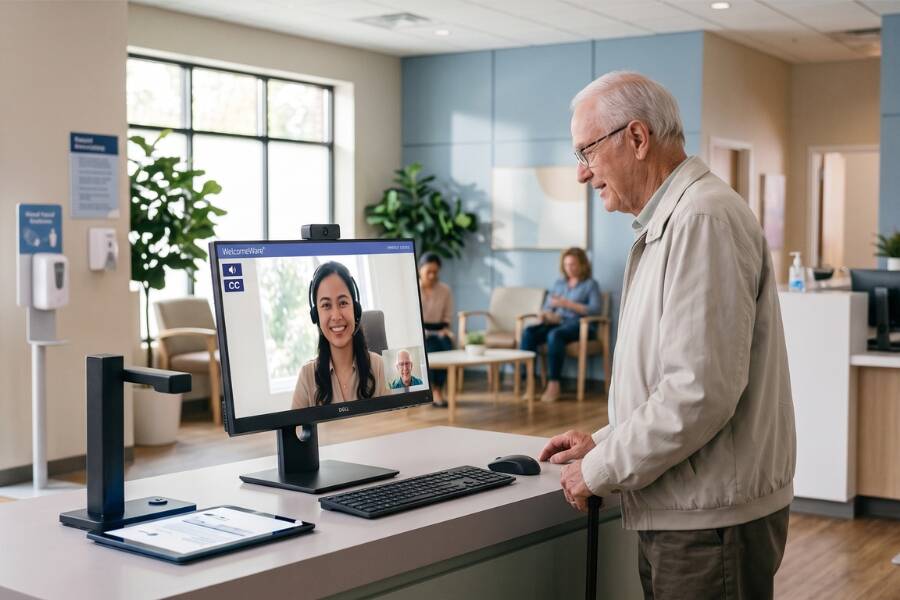
Choosing digital check-in solutions for urgent care requires more than comparing features.
The right platform should support the way your clinic actually operates, from patient registration and intake to staff workflows, privacy, and ongoing support.
This guide breaks down the key criteria urgent care operators should evaluate before choosing a digital check-in solution.
What Should Urgent Care Practices Look for in a Digital Check-In Solution?
When selecting digital check-in solutions for urgent care, practice leaders should assess how effectively each platform handles unscheduled arrivals, rapid registration, and patient flow.
Unlike scheduled outpatient environments, urgent care practices face fluctuating volume, varied patient comfort with technology, and unexpected arrival spikes.
According to the Urgent Care Association, urgent care centers care for more than 185 million patients annually across more than 15,000 U.S. locations.
Because walk-in access defines this care delivery model, practice leaders must evaluate digital intake technology based on operational flexibility, system reliability, data compatibility, and administrative efficiency rather than simple self-service hardware alone.
Start With Your Patient Check-In Workflow
Before comparing specific software features, map out how prospective platforms manage real-world patient arrival scenarios at your clinic counter:
Unscheduled Walk-In Arrival
→ Touchscreen Kiosk Registration
→ Queue Display & Triage
Connects to Assistance
↓
Live Remote Receptionist
↓
Registration Completed
When evaluating a vendor's workflow adaptability, confirm how their platform handles these key operational conditions:
- Unscheduled Walk-Ins: Can patients complete full registration on-site without a prior appointment or existing record?
- Pre-Registered Patients: Can visitors complete intake forms on personal devices beforehand and execute an express check-in upon arrival?
- Incomplete Digital Intake: Can a patient start intake forms on a smartphone and finish remaining fields seamlessly at the in-clinic kiosk?
- Patients Requiring Assistance: Can elderly, injured, or confused patients connect with a live representative directly from the registration point?
- High-Volume Surges: Does the system provide real-time arrival tracking to help staff monitor waiting room capacity during peak hours?
8 Criteria for Evaluating Urgent Care Digital Check-In Solutions
When comparing digital check-in solutions for urgent care, evaluate candidate vendors against eight core operational criteria.
1. Walk-In and Pre-Registration Support
- What to look for: A dual-channel intake framework allowing patients to complete forms on personal devices prior to the visit or register directly upon arrival.
- Why it matters in urgent care: Urgent care relies on walk-in access. A flexible platform manages unscheduled arrivals while giving pre-registered patients a rapid check-in path to help reduce physical lobby congestion.
- Question to ask candidate vendors: How does your software handle registration for walk-in patients who have not completed pre-visit documentation?
2. Live Assisted Check-In
- What to look for: A digital check-in system that gives patients immediate access to live virtual assistants directly at the point of arrival.
- Why it matters in urgent care: Patients arriving injured, uncomfortable, or unsure about registration requirements may struggle with unassisted digital screens. Live assistance helps them complete check-in while reducing pressure on onsite front-desk staff.
- Question to ask candidate vendors: Can patients connect directly with a live virtual assistant from the check-in kiosk when they arrive?
3. EMR and Practice Management Workflow Compatibility
- What to look for: Flexible data handling, including bulk patient uploads through structured files such as Excel or CSV and workflows that support existing EMR and practice management systems.
- Why it matters in urgent care: Administrative staff should not have to repeatedly re-enter demographic, insurance, and intake information captured during registration into internal software systems.
- Question to ask candidate vendors: How does information captured during digital check-in move into or work with our existing EMR or practice management workflow?
4. Digital Forms and Document Capture
- What to look for: Built-in form management supporting digital consent capture, custom layouts, PDF annotations, and sign-in log tracking.
- Why it matters in urgent care: Digital intake forms can standardize documentation, collect insurance information, and reduce paper-based administrative work.
- Question to ask candidate vendors: Can our administrative managers build, clone, and customize intake forms and agreement PDFs within the platform?
5. Privacy and Security
- What to look for: Secure document handling, HIPAA-compliant digital workflows, and physical privacy options such as attached phone handsets.
- Why it matters in urgent care: Busy, open waiting rooms make it difficult to protect Protected Health Information (PHI) when sensitive personal details are discussed during check-in. Guidance from the U.S. Department of Health & Human Services (HHS) emphasizes maintaining physical and administrative safeguards to protect patient privacy during registration.
- Question to ask candidate vendors: What visual and audio safeguards are built into the platform to protect patient privacy during sensitive conversations in busy, high-traffic lobbies?
6. Kiosk-Based Patient Accessibility
- What to look for: Dedicated touchscreen kiosk hardware that provides immediate access to virtual assistants without requiring patients to use personal devices, download apps, or maintain cellular data plans.
- Why it matters in urgent care: Requiring a personal smartphone can create friction for patients with low battery, limited data access, or less tolerance for mobile technology.
- Question to ask candidate vendors: Can any walk-in patient complete full registration on-site using the kiosk if they do not own a smartphone or lack cellular service?
7. Reporting and Administrative Management
- What to look for: Centralized web administrative controls paired with reporting tools that track button usage analytics, agent status logs, and performance summaries.
- Why it matters in urgent care: Tracking traffic trends helps operators adjust front-desk scheduling, while centralized management becomes especially valuable for multi-location clinic groups maintaining uniform check-in screen layouts.
- Question to ask candidate vendors: Can management update check-in screens, monitor usage metrics, and pull performance reports across locations from a central dashboard?
8. Implementation and Technical Support
- What to look for: End-to-end vendor involvement covering hardware deployment, software setup, staff training, and ongoing technical support.
- Why it matters in urgent care: System downtime stalls registration, causes waiting room backlogs, and increases stress on administrative and clinical staff.
- Question to ask candidate vendors: What dedicated technical support, hardware warranty coverage, and go-live assistance do you provide during and after launch?
What Should You Expect During Implementation?
Deploying a digital check-in solution across urgent care centers requires a structured implementation roadmap:
- Workflow Mapping & Screen Customization: Establish check-in pathways for walk-in arrivals versus pre-registered visits. Configure screen options, buttons, instructions, and practice branding.
- Digital Form Setup & Testing: Configure digital consent documents, sign-in log sheets, and pre-visit intake templates. Test form entries to verify accurate PDF generation and data export.
- Hardware Placement & Audio Assessment: Position touchscreen kiosks in direct line-of-sight from clinic entrances. Gauge lobby noise levels and deploy phone handset attachments where audio privacy is necessary.
- Staff Training & Workflow Integration: Train onsite staff on how patients move through assisted check-in workflows, when staff intervention is required, and how exceptions are handled.
- Go-Live Support & Ongoing Optimization: Launch the check-in platform with technical support on standby. Review usage analytics and operational reports after launch to identify opportunities to adjust staffing, workflows, or screen configurations.
How WelcomeWare Supports Urgent Care Check-In
WelcomeWare brings together touchscreen kiosks, digital intake forms, and live virtual administrative support to help urgent care practices manage patient arrivals and everyday front-desk responsibilities.
Core Platform Capabilities:
- Live Assisted Check-In: Patients connect directly with a live virtual receptionist at the kiosk for personalized, step-by-step arrival assistance.
- Touchscreen Kiosks & Handset Options: Interactive touchscreen kiosks with optional attached phone handsets ensure clear, private audio in noisy waiting rooms.
- WelcomeForms (Digital Intake): Enables pre-visit digital form completion on personal devices or on-site kiosk registration, supporting custom PDF creation and sign-in sheet tracking.
- Dedicated Welcomer Staffing: Full-time, dedicated administrative professionals who support front-desk greetings, inbound calls, insurance eligibility verification, appointment scheduling, and back-office tasks.
See how these capabilities fit your urgent care operations. Explore WelcomeWare's urgent care front desk solutions or schedule a demo to discuss your practice's check-in needs.