
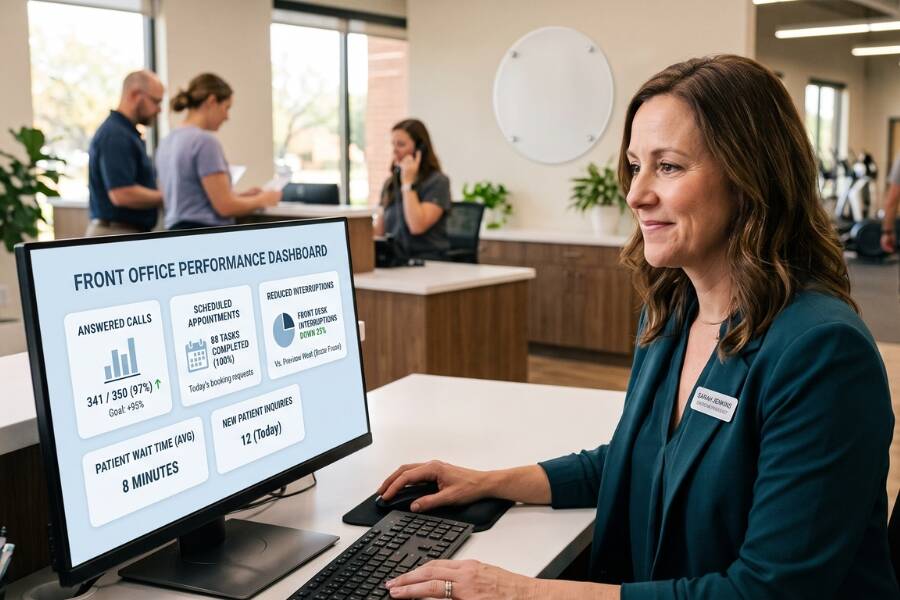
Use Baselines to Measure Performance: Evaluate virtual administrative support against your practice's existing performance baseline rather than relying only on activity metrics such as hours logged or calls handled.
Protect Physical Front-Desk Capacity: A virtual assistant can take on administrative work that would otherwise interrupt the physical front desk, reducing phone-related bottlenecks during high-traffic patient arrival periods and freeing on-site staff for face-to-face patient engagement.
Assess Operational Support Frameworks: To determine whether front-desk issues stem from individual Virtual Assistant (VA) performance or structural support gaps, assess coverage reliability, systems access, and defined escalation protocols.
For physical therapy practices, virtual assistants can provide much-needed administrative support. But simply adding another person to handle calls, scheduling, intake, or insurance tasks does not necessarily mean your front desk is operating more effectively.
The real question is whether that support is making a measurable difference. Are fewer calls being missed? Are scheduling requests handled faster? Is your on-site team spending less time switching between patients in the clinic and administrative work? And when something needs to be escalated, is it reaching the right person without creating another bottleneck?
Rather than evaluating a physical therapy virtual assistant by hours worked or tasks completed, practice leaders can look at operational performance before and after introducing virtual support.
An effective physical therapy virtual assistant takes on administrative work that would otherwise compete for on-site front-desk staff attention, including phone inquiries, patient intake, insurance verification, and scheduling. Evaluating this kind of support requires measuring operational performance against internal performance baseline metrics, not just simply tracking logged hours or call counts.
| EVALUATING VIRTUAL ASSISTANT PERFORMANCE | |
|---|---|
| ACTIVITY-BASED TRACKING (Limited) | OUTCOME-BASED MEASUREMENT (Actionable) |
| • Hours logged per shift | • Reduction in unanswered phone rates |
| • Counting raw phone calls handled | • Lower lobby interruption frequency |
| • Tallying administrative task lists | • Faster patient intake turnaround |
Adding virtual assistants to physical therapy practices can seem like an immediate answer to front-desk burnout and patient access bottlenecks. However, adding remote labor without established key performance indicators (KPIs) simply moves administrative confusion from an in-person desk to a remote channel. The right KPIs will vary depending on what responsibilities you assign your virtual assistant. The seven metrics below provide practical starting points for evaluating common front-desk and administrative workflows.
According to administrative burden research by the American Physical Therapy Association (APTA), 75% of surveyed physical therapy professionals reported adding administrative staff specifically to cope with rising administrative demands. Furthermore, 30% reported waiting one to two weeks for prior authorizations, while nearly 83% agreed or strongly agreed that prior authorization delays cause patients to abandon treatment entirely.
An unanswered call rate measures the proportion of inbound phone calls that go to voicemail or are abandoned by prospective and returning patients during operational hours. Tracking this metric against historical practice baselines reveals whether virtual administrative support effectively addresses incoming patient call volume during clinic hours.
Prospective patients who cannot reach the practice may leave a voicemail, call back later, or seek care elsewhere. Instead of aiming for an arbitrary zero-call-loss target, clinics should measure their baseline unanswered-call percentage before onboarding a virtual assistant and track whether virtual coverage reduces missed calls during peak hours.
Scheduling and rescheduling response time measures how quickly virtual administrative staff process new patient evaluation requests, manage cancellations, handle appointment modifications, and fill open calendar slots. Timely scheduling support can help practices maintain fuller schedules and make it easier for patients to stay on their planned visit schedule.
When patients encounter delays while trying to reschedule an appointment after an acute symptom surge or work conflict, the risk of a dropped visit increases. Measuring the average minutes required to process digital scheduling inquiries or return missed scheduling calls helps practice managers verify that virtual support maintains clinic schedule integrity.
Front-desk interruption reduction tracks how often physical receptionists are pulled away from greeting patients, managing check-ins, and handling other patient-facing responsibilities to manage incoming phone calls or administrative backlogs.
| Operational Area | Before Virtual Support | With Virtual Support |
|---|---|---|
| Phone Volume | Frequent phone interruptions at physical counter | Fewer phone interruptions at the physical front desk |
| Patient Check-In | Staff switch between calls and arriving patients | More phone and intake work delegated remotely |
| Reception Workflow | High front-desk task switching | More time available for in-person patient needs |
To evaluate this metric effectively:
Reducing phone-related interruptions during high-traffic arrival periods can give on-site staff more time to focus on patients in the clinic.
Patient follow-up completion rate tracks the percentage of assigned administrative tasks—such as gathering missing intake paperwork, contacting referring physician offices, managing re-authorization paperwork, and verifying secondary insurance—completed within the practice's established timeframe.
Incomplete pre-visit administrative work can contribute to billing delays, additional follow-up, and issues that must be resolved before or after the visit. Practice managers should set internal targets (such as processing pre-registration 24 hours before an appointment) and track the completion percentage achieved by virtual team members.
Evaluating peak-hour coverage resilience tracks how administrative performance holds up during patient morning rushes, mid-day lunch rotations, planned paid time off (PTO), and unexpected staff absences.
| WHAT TO MEASURE DURING HIGH-DEMAND PERIODS | |
|---|---|
| OPERATIONAL SITUATION | RECOMMENDED KPIs TO TRACK |
| Morning Rush | • Inbound missed calls & lobby check-in wait times |
| Lunch Coverage | • Calls reaching voicemail & phone response time |
| Staff Absence | • Administrative task delay & workload reallocation |
| Peak Scheduling Windows | • Appointment request turnaround & completion rates |
Virtual support can provide an additional administrative buffer when physical clinic staffing fluctuates.
Administrative task turnaround time measures the total elapsed time from when an administrative workflow item (such as processing an intake packet or logging referral information) is created to when it is fully resolved in the practice management system.
Administrative Turnaround Time = Timestamp of Completion − Timestamp of Task Creation
If delegated tasks consistently take longer to resolve after moving to virtual support, the practice should examine whether workflow access, training, handoffs, or task assignment creates a new bottleneck. Tracking cycle times across common workflows helps practice leaders determine whether remote delegation reduces, maintains, or adds to administrative turnaround time.
The escalation rate tracks the proportion of patient inquiries or administrative tasks that a virtual assistant must hand back to on-site clinic managers, billing staff, or physical therapists.
$$\text{Escalation Rate} = \left( \frac{\text{Total Handed-Off Tasks}}{\text{Total Handled Inquiries}} \right) \times 100$$
While complex clinical questions, billing disputes, and acute medical issues must be escalated, routine tasks—such as giving direction, basic scheduling, collecting co-pays, and gathering registration information—should be managed independently. The goal is not necessarily the lowest possible escalation rate; practices should distinguish between appropriate escalations and routine tasks that are being handed back unnecessarily.
Physical therapy practices evaluating virtual assistants should look beyond a single performance metric. Relying on one measure can create an incomplete picture of practice health. For instance, a virtual assistant might maintain a high call response volume while simultaneously generating scheduling errors due to rushed calls. Conversely, an assistant handling moderate call volume who successfully reduces physical front-desk interruptions can still provide meaningful relief to in-clinic staff. Practice leaders should evaluate a balanced combination of coverage, turnaround speed, accuracy, and front-desk relief.
When operational metrics indicate that front-desk burnout, missed calls, or administrative backlogs persist despite adding virtual support, practice leadership should evaluate whether the underlying staffing model fits the clinic's needs.
Evaluate virtual administrative models using these criteria:
For physical therapy practices using virtual assistants, tracking operational metrics isn't about expecting perfection. It is about understanding whether your staffing setup is actively solving the operational challenges facing your clinic. If unanswered call rates remain high, administrative tasks keep bouncing back to in-clinic staff, or lobby check-in queues build up during peak hours, these metrics help identify where workflow support needs to evolve.
WelcomeWare combines live virtual administrative staff, patient-facing kiosks, and front-desk management tools to help healthcare practices extend administrative coverage across front-office and back-office workflows.
Central to the platform are WelcomeWare’s Welcomers, dedicated virtual assistants for physical therapy practices who support both front-desk and back-office operations. Our Welcomers greet arriving patients via live video on touchscreen kiosks, answer inbound calls, collect co-pays, schedule follow-up appointments, verify insurance eligibility, and manage referral records directly within the practice's EMR.
Supported by software management tools, WelcomeWare provides healthcare practices with structured front-desk coverage, actionable operational data, and consistent administrative support.
Talk with WelcomeWare about your current front-desk workflow and see how Welcomers can support patient check-ins, phone coverage, scheduling, and other administrative responsibilities.


